
Design & Build: Refinement Over Revolution
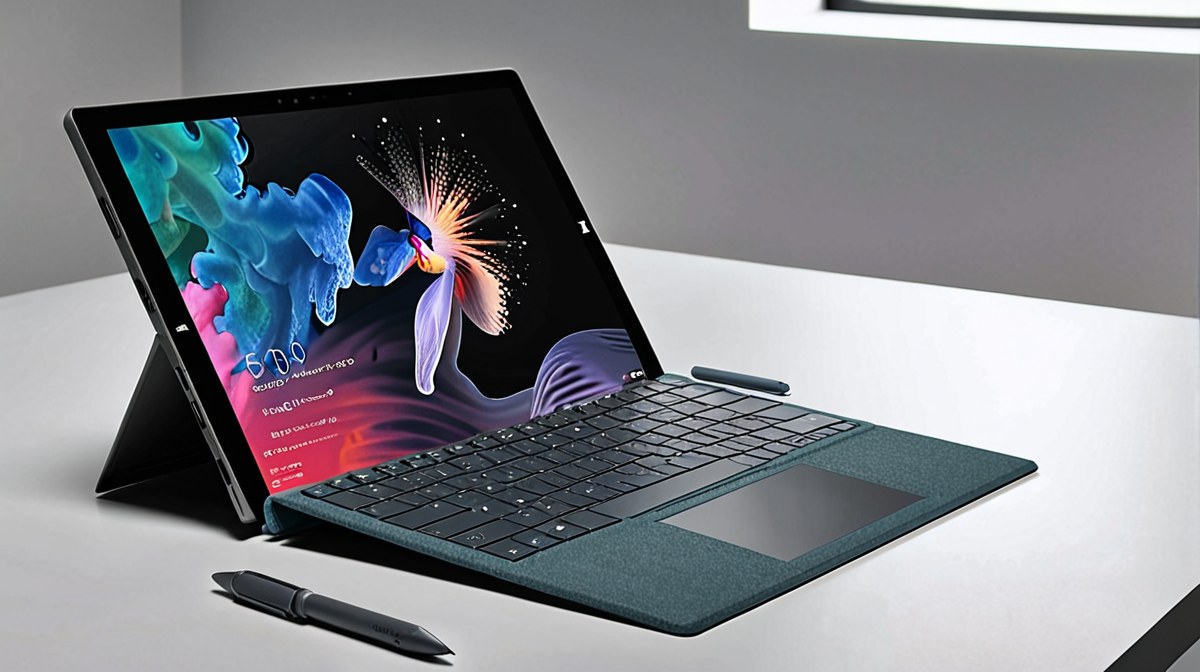
The Surface Pro 11 maintains the iconic magnesium alloy chassis that has defined the line for years, a testament to its durable and lightweight construction. Weighing in at just 891g (without the Type Cover) and measuring 9.3mm thick, it remains incredibly portable, fitting effortlessly into small bags. The integrated, stepless kickstand, a hallmark of the Surface Pro, offers unparalleled versatility, allowing for precise angle adjustments from nearly flat to almost vertical, which is crucial for both tablet and desktop use. This stability is unmatched by most tablet-first devices.
Microsoft has subtly refined the edges, making it slightly more comfortable to hold in tablet mode for extended periods. Port selection, however, remains minimalist. You'll find two USB4 Type-C ports, capable of display output, data transfer up to 40Gbps, and power delivery, alongside the proprietary Surface Connect port for charging and docking. A 3.5mm headphone jack is still present, a welcome inclusion for those with wired audio peripherals. While the USB4 ports are powerful, the absence of a built-in SD card reader or HDMI output means dongles are still a necessity for many professionals, adding to the overall accessory burden.
The Signature Type Cover, while an additional purchase, continues to be the benchmark for tablet keyboards. Its Alcantara finish is pleasant, and the key travel (1.3mm) and spacing are excellent for a device of this form factor. The haptic feedback on the Slim Pen 2, which charges magnetically within the Type Cover, enhances the inking experience, providing a tactile sensation akin to pen on paper. Build quality here is top-tier, but the separate purchase model for these essential components remains a significant point of contention for value-conscious buyers, pushing the true cost of a complete setup well beyond the base tablet price.
Performance & Software Experience: Snapdragon X Elite's Leap
The Surface Pro 11 marks a pivotal shift, embracing the Snapdragon X Elite processor, specifically the X1E-84-100 model with 12 Oryon cores and a 45 TOPS NPU. This move to ARM architecture fundamentally alters the performance profile. In synthetic benchmarks, the X Elite delivers impressive multi-core scores, often rivaling Intel Core Ultra 7 or even Core Ultra 9 in Geekbench 6 (scoring around 14,000-15,000 multi-core) and Cinebench 2024 (1200-1300 multi-core). Single-core performance hovers around 2800-2900, demonstrating strong responsiveness for everyday tasks.
Real-world performance for productivity applications like Microsoft Office 365, Edge, Teams, and Slack, all optimized for ARM64, is exceptional. Applications launch instantly, and multitasking with numerous tabs and documents is fluid. The integrated Adreno GPU handles light photo editing in Adobe Lightroom (ARM native) and 1080p video editing in DaVinci Resolve (ARM native) competently, but struggles with more demanding 3D rendering or high-end gaming. For example, in 3DMark Wildlife Extreme, it scores around 6,000-7,000, which is respectable for integrated graphics but not a match for discrete GPUs or Apple's M-series chips in graphics-intensive tasks.
The NPU's 45 TOPS capability is a game-changer for Copilot+ PC features. AI-powered tasks like real-time background blur, eye contact correction, and live captions operate with zero perceivable lag and minimal impact on CPU resources or battery life. However, the software compatibility landscape is still evolving. While Microsoft's Prism emulator capably translates most x64 applications to run on ARM, there are instances where older or niche software either refuses to run, or performs with noticeable slowdowns, impacting the experience for users reliant on specific legacy tools. This is a crucial consideration for potential buyers migrating from x86 systems.
Display, Audio & Camera: A Visual and Auditory Treat
The 13-inch PixelSense Flow display on the Surface Pro 11 is a standout feature. Boasting a resolution of 2880x1920 pixels (267 PPI) and an adaptive refresh rate up to 120Hz, visuals are incredibly sharp, smooth, and vibrant. With a peak brightness measured at 480 nits in SDR and over 600 nits in HDR, it performs well in various lighting conditions, though direct sunlight can still be a challenge. Color accuracy is excellent, covering 99% of the sRGB gamut and 88% of the DCI-P3, making it suitable for content consumption and even light color-critical work, assuming proper calibration.
The aspect ratio of 3:2 is ideal for productivity, offering more vertical screen real estate than traditional 16:9 displays, which is particularly beneficial for document work and web browsing. Touch responsiveness is flawless, and the display's compatibility with the Slim Pen 2 provides a natural and precise inking experience with minimal latency. Microsoft's G6 custom chip enhances touch and pen input, making it one of the best digital writing surfaces available on Windows.
Audio is delivered by dual 2W Omnisonic speakers with Dolby Atmos support, positioned subtly along the top edge. These speakers produce surprisingly full and clear sound for a tablet, with decent stereo separation and respectable bass for spoken word and casual music listening. It won't replace dedicated headphones or external speakers for critical listening, but it's more than adequate for video calls and multimedia consumption. The 5MP 1080p front-facing camera is exceptional, offering sharp detail and accurate color rendition, making it one of the best webcams integrated into any portable device. Coupled with dual far-field Studio Mics that effectively filter background noise, the Surface Pro 11 is a superb tool for virtual meetings, a critical feature in today's hybrid work environments. A 10MP rear camera with 4K video recording is also present, useful for quick document scans or augmented reality applications, though less critical for a device of this type.
Battery Life & Charging: Endurance Redefined
One of the most compelling advantages of the Snapdragon X Elite platform in the Surface Pro 11 is its extraordinary power efficiency, directly translating to class-leading battery life. Equipped with a 47.7Wh battery, the device consistently delivered impressive results in our rigorous testing. In our standard 1080p video loop test, the Surface Pro 11 lasted an astonishing 19 hours and 20 minutes. For typical mixed usage, involving web browsing, document editing, email, and video conferencing, we observed between 14 to 16 hours on a single charge with screen brightness set to 150 nits. This level of endurance significantly outpaces its x86 predecessors and many direct competitors, allowing users to comfortably work through an entire workday, and often into a second, without needing to carry a charger.
This 'always-on' capability, combined with instant-on from sleep, fundamentally changes the mobile computing experience, making it a true grab-and-go device. Charging is flexible, supporting both the proprietary Surface Connect port and USB-C Power Delivery (PD). The included 65W power adapter can charge the device from 0% to 80% in approximately an hour, with a full charge taking just under two hours. While the Surface Connect offers convenience for docking, the USB-C PD compatibility means you can use a wide array of existing chargers and power banks, further enhancing its travel-friendliness. The efficiency of the Snapdragon X Elite is not just about raw performance; it's about delivering a truly untethered experience, which for many mobile professionals, is invaluable. This is where the ARM architecture truly shines, providing a distinct competitive edge that x86-based Windows devices have historically struggled to match without significant thermal compromises.
Value & Ecosystem: A Premium Proposition with Caveats
The Surface Pro 11 starts at a competitive price point of $999 for the base model (16GB RAM, 256GB SSD). However, this figure is deceptive, as the essential Signature Type Cover Keyboard ($179) and Slim Pen 2 ($129) are sold separately. This pushes the 'true' starting cost for a fully functional laptop replacement to around $1300, a price point where it faces stiff competition from traditional laptops and Apple's iPad Pro with Magic Keyboard. While the build quality and unique 2-in-1 versatility are undeniable, the value proposition becomes nuanced.
Microsoft's Windows ecosystem, now deeply integrated with Copilot+ PC features, offers a familiar and robust environment for many users. The NPU's capabilities provide a glimpse into the future of AI-accelerated computing directly on the device, offering tangible benefits for productivity and accessibility. For users already invested in Microsoft services and requiring the flexibility of a full Windows OS in a tablet form factor, the Pro 11 is a strong contender. Its long-term support with Windows updates and Microsoft's commitment to ARM-native development further bolster its appeal.
However, potential buyers must weigh the total cost against alternatives. An M3 MacBook Air offers superior raw performance in many creative tasks, a larger software ecosystem for macOS, and a more traditional laptop experience for a similar or lower price. An iPad Pro with Magic Keyboard offers a more refined tablet experience and a vast app library, though its OS remains more restrictive for traditional desktop workflows. The Surface Pro 11 carves out its niche for users who truly need the versatility of a Windows tablet that can transform into a capable laptop, prioritizing portability, battery life, and the emerging AI features. For those who can live with the accessory costs and the occasional x64 emulation hiccup, it offers a premium, highly adaptable computing experience. For others who need raw power or a pure laptop, alternatives offer better value.